Streamlining Communication: Integrating Top Messaging Tools for US Remote Teams

Anúncios
In the rapidly evolving landscape of modern work, particularly for organizations operating with a distributed workforce across the United States, effective Remote Team Communication is not just a buzzword; it’s the bedrock of success. The year 2026 brings with it a sophisticated array of messaging tools, each promising to enhance collaboration and productivity. However, the sheer volume of options can often lead to fragmentation rather than cohesion. This comprehensive guide will delve into the art and science of integrating these top messaging tools, ensuring your US remote team operates as a single, well-oiled machine.
The challenges of remote work are multifaceted. Time zone differences, diverse communication preferences, and the inherent lack of serendipitous interactions that occur in a physical office can all impede progress. Without a strategic approach to Remote Team Communication, teams risk miscommunication, missed deadlines, and a decline in morale. This article aims to provide a practical roadmap for businesses looking to optimize their communication infrastructure, focusing on integration strategies that yield tangible benefits for US-based remote operations.
Understanding the current state of remote work in the US, it’s clear that hybrid and fully remote models are here to stay. This permanence necessitates a robust and adaptable communication strategy. We’ll explore how to move beyond simply using multiple tools to truly integrating them, creating a seamless flow of information and collaboration that empowers every team member, regardless of their physical location.
Anúncios
The Evolving Landscape of Remote Team Communication in 2026
The technological advancements shaping Remote Team Communication in 2026 are significant. We’ve moved past basic chat applications to sophisticated platforms offering integrated video conferencing, project management features, AI-powered assistance, and advanced security protocols. The key is not just identifying these tools but understanding how they can work together harmoniously.
For US remote teams, compliance and data sovereignty are increasingly important considerations. Tools that offer robust encryption, data residency options, and adherence to US privacy regulations (like CCPA, where applicable) are becoming non-negotiable. Moreover, the demand for user-friendly interfaces that reduce the learning curve and encourage adoption remains high. The best tools of 2026 are those that balance advanced functionality with intuitive design, making effective Remote Team Communication accessible to all.
Artificial intelligence is also playing a transformative role. AI-powered transcription services for meetings, intelligent notification management, and even sentiment analysis in team communications are emerging features that can significantly enhance efficiency and understanding. As we look at integration, consider how these AI capabilities can be leveraged across your chosen platforms to further streamline workflows.
Anúncios
Identifying Your Team’s Communication Needs: A Foundation for Integration
Before diving into specific tools, a thorough assessment of your team’s unique Remote Team Communication needs is paramount. This isn’t a one-size-fits-all solution. Consider the following:
- Team Size and Structure: Is your team small and agile, or a large enterprise with multiple departments? Different scales require different solutions.
- Nature of Work: Do your projects require constant real-time collaboration, or is asynchronous communication more common? Are there frequent client interactions?
- Existing Tools and Workflows: What tools are currently in use? Are there any legacy systems that need to be considered? Understanding existing habits is crucial for successful adoption.
- Security and Compliance Requirements: For US-based teams, especially in regulated industries, data security, privacy, and compliance with relevant laws are critical.
- Budget: While investing in good tools is essential, a realistic budget will guide your choices.
- Integration Ecosystem: What other software do you rely on (e.g., CRM, project management, HR platforms)? The chosen messaging tools should ideally integrate with these.
Conducting surveys, holding focus groups, and analyzing current communication patterns can provide valuable insights. Understanding what works and what doesn’t from your team’s perspective will inform your strategy for enhancing Remote Team Communication effectively.
Top Messaging Tools for US Remote Teams in 2026 and Their Strengths
As of 2026, several platforms stand out for their robust features and suitability for US remote teams. Here’s a look at some of the leaders and their unique strengths:
Slack: The Collaboration Hub
Slack continues to be a powerhouse for real-time team communication. Its channel-based organization allows for focused discussions on specific projects, departments, or topics. Strengths include:
- Extensive Integrations: Slack boasts thousands of integrations with other business applications (Google Drive, Asana, Salesforce, etc.), making it a central hub for many workflows.
- User-Friendly Interface: Its intuitive design ensures quick adoption.
- Searchability: Powerful search capabilities make it easy to find past conversations and files.
- Customization: Bots, custom emojis, and workflows allow teams to tailor the experience.
- Huddles and Clips: Quick audio/video calls and short video messages facilitate spontaneous communication, mirroring in-office interactions.
For US teams, Slack offers enterprise-grade security and compliance features, making it a reliable choice for sensitive data.
Microsoft Teams: The Enterprise Powerhouse
Integrated within the Microsoft 365 ecosystem, Teams is particularly strong for organizations already heavily invested in Microsoft products. Key advantages for Remote Team Communication include:
- Seamless Microsoft 365 Integration: Direct access to Outlook, SharePoint, OneDrive, Word, Excel, and PowerPoint without leaving the application.
- Robust Video Conferencing: High-quality meetings with features like live captions, virtual backgrounds, and breakout rooms.
- Comprehensive Collaboration: Combines chat, video, file sharing, and app integration into a single platform.
- Advanced Security and Compliance: Enterprise-level security, data governance, and compliance features, crucial for US businesses.
- Co-authoring: Real-time co-authoring of Office documents directly within Teams.
Its strength lies in providing a unified environment for all aspects of work, from communication to document creation and project management.
Zoom Chat: Beyond Video Meetings
While primarily known for its video conferencing, Zoom Chat has evolved into a formidable messaging platform, offering a strong alternative or complement for Remote Team Communication. Its benefits include:
- Familiarity: Most remote workers are already familiar with Zoom for meetings, reducing the learning curve for its chat features.
- Integrated Experience: Seamlessly switch from a chat conversation to a video call.
- Reliable Performance: Known for its stability and high-quality audio/video.
- File Sharing and Integrations: Supports file sharing and integrates with a growing number of third-party apps.
For teams that frequently use Zoom for meetings, leveraging Zoom Chat can consolidate communication within a single vendor ecosystem.
Google Chat/Spaces: The Google Workspace Advantage
For teams operating within the Google Workspace ecosystem, Google Chat (now often referred to as Google Spaces) offers deep integration with Gmail, Calendar, Drive, and Docs. Its strengths are:
- Native Google Workspace Integration: Unparalleled synergy with other Google services.
- Spaces for Organized Collaboration: Dedicated spaces for projects and teams, combining chat, files, and tasks.
- AI-Powered Features: Smart replies, meeting summaries, and intelligent search.
- Accessibility: Easy access from Gmail and other Google apps.
Google Chat is an excellent choice for US remote teams already utilizing Google Workspace for their productivity suite.
Other Notable Tools
- Discord: Popular for its voice channels and community-building features, increasingly adopted by tech teams for its low-latency communication.
- Twist: Designed for asynchronous communication, reducing the pressure of real-time responses and promoting thoughtful discussions.
- Mattermost: An open-source alternative for teams requiring self-hosting and maximum control over their data, often used by government contractors or highly secure environments in the US.
Strategies for Integrating Messaging Tools for Optimal Remote Team Communication
The real power comes not from using one tool, but from strategically integrating several to create a cohesive ecosystem for Remote Team Communication. Here are practical strategies:
1. Define Primary and Secondary Tools
Designate one tool as the primary hub for daily, real-time communication (e.g., Slack or Microsoft Teams). Other tools can serve secondary, specialized functions. For instance, Zoom might be exclusively for external video meetings, while your primary tool handles internal chats and quick calls.
2. Leverage Native Integrations
Most leading messaging platforms offer native integrations with other popular business tools. Explore these first. For example, integrating Slack with Asana allows project updates to flow directly into relevant Slack channels. Microsoft Teams seamlessly integrates with SharePoint for document management. These native connections are often the most stable and easiest to set up, significantly improving Remote Team Communication workflows.
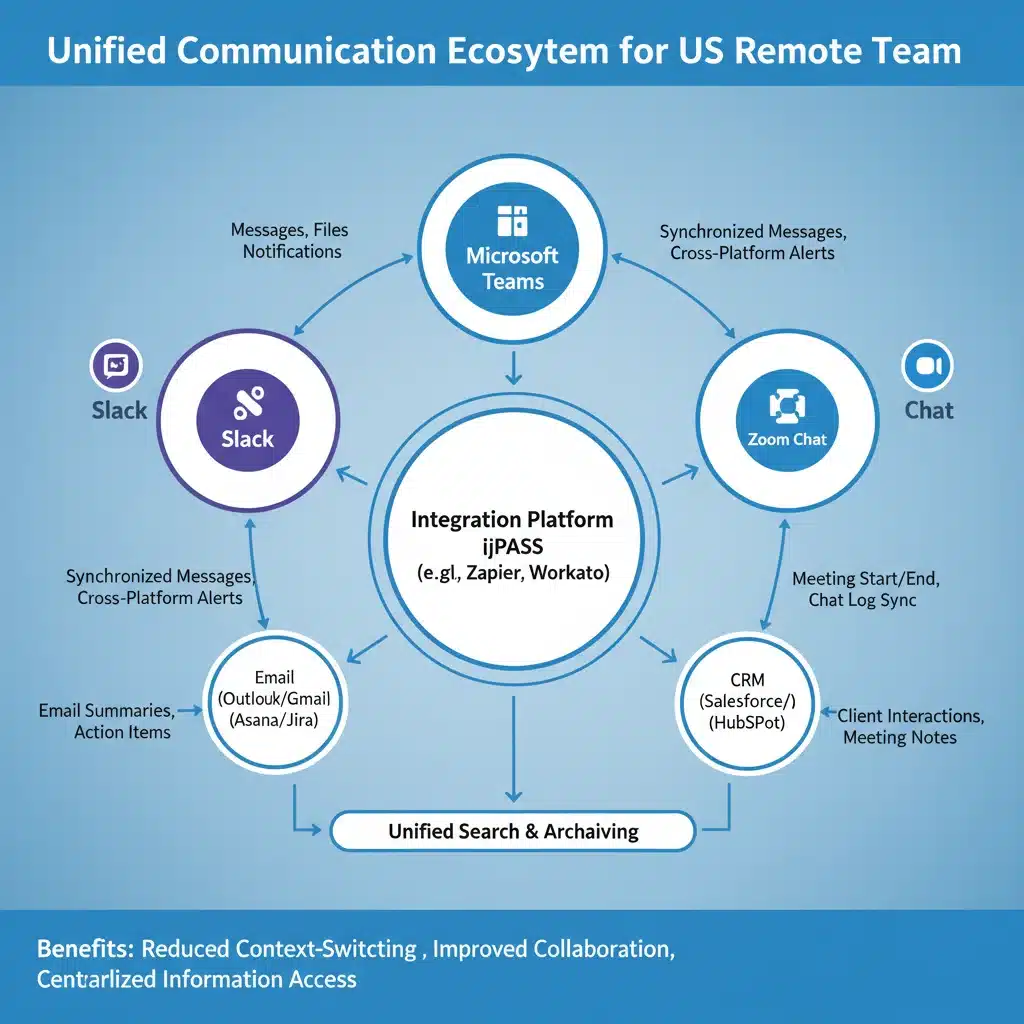
3. Utilize Third-Party Integration Platforms
For tools without native integration, platforms like Zapier, Integromat (Make), or Workato can bridge the gap. These automation platforms allow you to create custom workflows, triggering actions in one app based on events in another. Examples include:
- Posting a new Trello card to a Slack channel.
- Saving Zoom meeting recordings to Google Drive and notifying a Teams channel.
- Creating a new task in Asana when a specific keyword is mentioned in a Slack conversation.
These platforms are invaluable for creating a truly interconnected communication environment, ensuring information flows smoothly across all chosen tools for Remote Team Communication.
4. Establish Clear Communication Protocols
Integration is only half the battle; how your team uses the integrated tools is equally important. Develop clear guidelines for:
- Which tool for what purpose: E.g., "Use Slack for quick internal questions, Teams for project-specific discussions, and email for formal external communications."
- Response expectations: Clearly define expected response times for different channels.
- Notification management: Encourage team members to customize notifications to avoid overload.
- Meeting etiquette: Best practices for video calls, including camera usage, muting, and chat participation.
These protocols are essential for preventing communication chaos and ensuring that the integrated tools enhance, rather than hinder, Remote Team Communication.
5. Centralize File Sharing and Document Management
Avoid scattering documents across multiple platforms. Choose a primary cloud storage solution (e.g., Google Drive, OneDrive, Dropbox) and integrate it with your messaging tools. This ensures that all team members access the most up-to-date versions of documents, reducing confusion and improving collaboration. When a file is shared in a chat, it should link back to this centralized repository.
6. Implement Single Sign-On (SSO)
For enterprise-level US remote teams, implementing SSO across all communication tools simplifies access and enhances security. This reduces password fatigue for users and strengthens overall security posture, a critical aspect of managing multiple platforms for Remote Team Communication.
7. Regular Training and Feedback Loops
New tools and integrations require ongoing training. Conduct workshops, create knowledge bases, and provide regular refreshers. More importantly, establish channels for feedback. Regularly solicit input from your team on what’s working and what isn’t. Be prepared to adapt and refine your strategy based on their experiences. The goal is to make Remote Team Communication as effortless and productive as possible for everyone.
Case Study: A US Tech Startup’s Integration Journey
Consider "InnovateTech," a US-based tech startup with 150 remote employees spread across various states. Initially, they struggled with fragmented communication: Slack for daily chats, Zoom for meetings, Asana for project management, and Google Drive for files. Information silos were common, and productivity suffered.
Their integration strategy for Remote Team Communication involved:
- Primary Hub: Slack was designated the primary communication hub.
- Native Integrations:
- Asana was integrated with Slack, so task updates and completions automatically posted to relevant project channels.
- Google Drive was connected, allowing direct sharing of files in Slack and seamless co-editing.
- Third-Party Automation (Zapier):
- Zoom meeting recordings were automatically uploaded to a specific Google Drive folder, and a link was shared in the relevant Slack channel after each meeting.
- Customer support tickets from Zendesk were routed to a dedicated Slack channel, allowing the support team to collaborate on solutions in real-time.
- Clear Protocols: They established "Slack for urgent matters, Asana for task tracking, Zoom for scheduled video calls, and email for external clients."
- Training: Monthly "Tech Tuesday" sessions were introduced to demonstrate new features and best practices for using the integrated tools.
Result: InnovateTech saw a 30% reduction in internal email volume, a 20% increase in project completion rates, and significantly improved team morale. The seamless flow of information fostered better collaboration and reduced the overhead associated with switching between applications for Remote Team Communication.
Challenges and How to Overcome Them in Remote Team Communication
Despite the benefits, integrating messaging tools for Remote Team Communication comes with potential hurdles:
1. Tool Fatigue and Overwhelm
Having too many tools, even if integrated, can lead to "tool fatigue." The solution is strategic simplification: prioritize core tools, consolidate where possible, and ensure every tool serves a distinct, valuable purpose. Emphasize the "why" behind each tool’s selection and its role in the integrated ecosystem. Regular audits of your tool stack can identify underutilized or redundant applications.
2. Data Silos and Inconsistent Information
Without proper integration, information can get stuck in different platforms. This is where robust integration platforms (Zapier, etc.) and strict adherence to communication protocols become critical. Ensure that critical information is always cross-posted or synchronized to the relevant central repository or communication channel.
3. Security Concerns
Each new tool or integration introduces potential security vulnerabilities. Prioritize tools with strong security features, ensure all integrations are authorized and secure, and educate your team on best practices for data handling. For US teams, understanding data residency and compliance with local regulations is paramount. Regularly review access permissions and integration settings.
4. User Adoption and Resistance to Change
People are naturally resistant to change. Overcome this by involving the team in the selection process, providing comprehensive training, highlighting the benefits (e.g., "this will save you time"), and having visible leadership champion the new system. A gradual rollout with pilot teams can also ease the transition for Remote Team Communication improvements.

5. Cost Management
Licensing fees for multiple tools and integration platforms can add up. Regularly review your subscriptions and usage. Negotiate bulk licenses where possible. Sometimes, consolidating to a single, more comprehensive suite (like Microsoft 365 or Google Workspace) can be more cost-effective than paying for multiple standalone tools, especially when considering the total cost of ownership for Remote Team Communication infrastructure.
The Future of Remote Team Communication: What’s Next?
Looking beyond 2026, the evolution of Remote Team Communication will likely be driven by even more sophisticated AI, deeper metaverse integrations, and enhanced spatial computing. Imagine:
- AI-Powered Assistants: More advanced AI bots that can not only summarize meetings but also proactively identify potential blockers, suggest solutions, and even draft responses based on context.
- Immersive Collaboration: Virtual reality and augmented reality spaces becoming commonplace for team meetings, allowing for a more "present" feeling, regardless of physical location.
- Hyper-Personalized Communication: Tools adapting to individual communication styles and preferences, optimizing message delivery and timing for maximum impact and minimal interruption.
- Enhanced Security and Privacy: Quantum-resistant encryption and decentralized communication networks becoming standard, offering unparalleled data protection for sensitive US business operations.
Staying abreast of these trends will be crucial for maintaining a competitive edge and ensuring your Remote Team Communication strategy remains future-proof.
Conclusion: Building a Cohesive Communication Ecosystem
Streamlining Remote Team Communication for US remote teams in 2026 is about more than just picking the "best" tools; it’s about intelligently integrating them to create a synergistic ecosystem. By carefully assessing your needs, selecting appropriate platforms, leveraging native and third-party integrations, and establishing clear communication protocols, you can transform fragmented interactions into a seamless flow of information and collaboration.
The benefits are profound: increased productivity, improved morale, reduced miscommunication, and a stronger, more connected team culture. While challenges exist, with a strategic approach, continuous training, and a willingness to adapt, your organization can master the art of integrated Remote Team Communication, ensuring your US remote workforce thrives in the years to come. Embrace the future of work by building a communication infrastructure that truly empowers your team, fostering innovation and success from anywhere.