Remote Work Productivity: Optimize Your Setup for 2026
Anúncios
The landscape of work has irrevocably shifted, with remote work becoming not just a temporary solution but a fundamental pillar of modern professional life. As we hurtle towards 2026, the demand for highly efficient, comfortable, and sustainable remote work environments is escalating. It’s no longer enough to just ‘make do’ with a makeshift setup; optimizing your remote work setup is paramount for sustained productivity, well-being, and career success. This comprehensive guide will delve into five critical tweaks that will transform your home office into a powerhouse of focus and efficiency, ensuring you’re not just keeping up, but excelling in the future of work.
The core of successful remote work lies in creating an environment that minimizes distractions, maximizes comfort, and fosters deep work. Many remote professionals still struggle with suboptimal setups that lead to burnout, decreased productivity, and even physical ailments. This article aims to address these challenges head-on, providing actionable strategies to refine your remote work setup. We’ll explore everything from ergonomic considerations to the integration of smart technology, all designed to enhance your work experience and keep you at the top of your game.
The Imperative of an Optimized Remote Work Setup in 2026
Why is optimizing your remote work setup more crucial now than ever? The answer lies in the evolving nature of remote work itself. What began as a necessity has matured into a sophisticated operational model. Companies are investing heavily in remote infrastructure, and employees are expected to maintain, if not exceed, their in-office productivity levels. An unoptimized setup can be a significant bottleneck, hindering your ability to perform at your best. Furthermore, the lines between work and personal life can blur in a home environment, making a dedicated and well-structured workspace essential for maintaining a healthy work-life balance.
Anúncios
Beyond productivity, your physical and mental well-being are directly linked to your work environment. Poor ergonomics can lead to chronic pain, while a cluttered or distracting space can contribute to stress and reduced cognitive function. By proactively enhancing your remote work setup, you’re not just improving your output; you’re investing in your long-term health and professional longevity. This article is your blueprint for creating a remote work setup that supports both your ambitions and your well-being.
Tweak 1: Ergonomic Excellence & Posture Perfection
One of the most fundamental aspects of an effective remote work setup is ergonomics. Ignoring ergonomic principles can lead to a host of problems, including back pain, neck strain, carpal tunnel syndrome, and reduced focus. In 2026, with prolonged screen times becoming the norm, investing in ergonomic excellence is not a luxury, but a necessity. This tweak focuses on ensuring your body is properly supported and aligned, allowing you to work comfortably for extended periods without discomfort.
Anúncios
The Core Components of an Ergonomic Remote Work Setup
- Ergonomic Chair: This is arguably the most important investment you can make. Look for a chair with adjustable lumbar support, armrests, seat height, and tilt. The goal is to support the natural curve of your spine and allow your feet to be flat on the floor or on a footrest, with your knees at a 90-degree angle.
- Adjustable Desk (Standing/Sitting): A sit-stand desk offers the flexibility to alternate between sitting and standing throughout the day, which has been shown to reduce sedentary behavior and improve circulation and energy levels. If a standing desk isn’t feasible, ensure your current desk allows your forearms to be parallel to the floor when typing.
- Monitor Placement: Your monitor should be at arm’s length, with the top of the screen at or slightly below eye level. This prevents neck strain from looking up or down. If you use a laptop, an external monitor is highly recommended, paired with a laptop stand to elevate your screen.
- External Keyboard and Mouse: Using a separate ergonomic keyboard and mouse allows for more natural hand and wrist positioning, reducing the risk of repetitive strain injuries. Consider a split keyboard or a vertical mouse if you experience discomfort.
- Proper Lighting: Good lighting reduces eye strain. Natural light is ideal, but if unavailable, use diffuse, indirect lighting. Avoid overhead lights that create glare on your screen.
Implementing these ergonomic principles into your remote work setup will not only alleviate physical discomfort but also significantly boost your ability to concentrate and perform. Think of it as creating a performance-enhancing environment for your body. Regular breaks and stretching exercises are also crucial complements to any ergonomic setup, ensuring blood flow and preventing stiffness.
Many people underestimate the long-term impact of poor posture and an unsupportive chair. By 2026, with the widespread acceptance of remote work, these issues have become more prevalent. Companies are even starting to offer ergonomic stipends to employees, recognizing the importance of a healthy home office. Don’t wait for pain to set in; proactively optimize your remote work setup for comfort and longevity.
Tweak 2: Decluttering and Digital Minimalism for Focus
A cluttered physical space often translates to a cluttered mind. Similarly, a chaotic digital environment can be a major source of distraction. The second tweak for your remote work setup focuses on decluttering both your physical workspace and your digital life to create a serene and focused environment. This approach, often referred to as digital minimalism, is about intentionally reducing distractions to maximize your attention and productivity.
Physical Decluttering Strategies:
- "Everything Has A Home" Rule: Assign a specific place for every item on your desk. When you’re done using something, put it back. This simple rule prevents clutter from accumulating.
- Minimize Visual Noise: Keep only essential items on your desk. Personal items are fine, but ensure they don’t create visual clutter. A clean, minimalist desk helps your brain focus on the task at hand.
- Cable Management: Tangled cables are not only unsightly but can also be a safety hazard. Invest in cable ties, sleeves, or a cable management box to keep wires organized and out of sight.
- Regular Cleaning: A clean desk contributes to a clear mind. Schedule a few minutes each day or week to tidy up your workspace.
Digital Minimalism for Enhanced Focus:
- Desktop Organization: Keep your computer desktop clean and organized. Use folders to categorize files and delete unnecessary shortcuts.
- Notification Management: Turn off non-essential notifications on your computer and phone. Only allow notifications that are critical for your work.
- Browser Tab Discipline: Avoid having too many browser tabs open simultaneously. Use tab groups or a tab management extension to keep things organized or close tabs once you’re done with them.
- Digital Detox Periods: Schedule dedicated times to check emails and social media, rather than constantly being interrupted by them. Consider using website blockers during deep work sessions.
- Streamline Software: Uninstall software you no longer use. A lean system runs faster and presents fewer distractions.
By implementing these physical and digital decluttering strategies, you create a remote work setup that supports deep work and minimizes cognitive load. This proactive approach to managing your environment is critical for maintaining focus in an increasingly distracting world. In 2026, where information overload is a constant threat, a minimalist approach to your workspace can be your greatest asset.
Tweak 3: Optimizing Connectivity and Technology Integration
In the age of remote work, your internet connection and technological infrastructure are the lifeblood of your productivity. Slow internet, unreliable Wi-Fi, or outdated equipment can lead to frustration, missed deadlines, and a significant drop in efficiency. This tweak focuses on ensuring your remote work setup is powered by robust connectivity and seamlessly integrated technology, ready for the demands of 2026 and beyond.
Ensuring Robust Connectivity:
- High-Speed Internet Plan: Invest in the fastest and most reliable internet plan available in your area. This is non-negotiable for video calls, large file transfers, and cloud-based applications.
- Reliable Wi-Fi Router: An outdated router can bottleneck even the fastest internet speed. Upgrade to a modern Wi-Fi 6 (or newer) router, especially if you have multiple devices connected. Consider a mesh Wi-Fi system for larger homes to eliminate dead zones.
- Ethernet Connection: For critical tasks like video conferencing or large downloads, a direct Ethernet connection to your router is always more stable and faster than Wi-Fi.
- Backup Internet Plan: For mission-critical roles, consider a backup internet solution, such as a mobile hotspot or a secondary internet provider, to ensure continuity during outages.
Seamless Technology Integration:
- Quality Peripherals: A good quality webcam and microphone are essential for professional video calls. Built-in laptop cameras and mics are often subpar.
- Dual Monitors (or Ultrawide): Many professionals find that a dual monitor setup significantly boosts productivity by allowing them to view multiple applications simultaneously. An ultrawide monitor can offer a similar benefit with less bezel interruption.
- Cloud-Based Collaboration Tools: Fully embrace tools like Microsoft 365, Google Workspace, Slack, and Zoom. Ensure you’re proficient in using them for efficient communication and collaboration.
- Smart Home Integration (Optional but Beneficial): Smart lighting can be programmed to adjust based on time of day, reducing eye strain. Smart plugs can automate device power, saving energy. Voice assistants can help manage calendars or set reminders.
- Power Backup: A UPS (Uninterruptible Power Supply) can protect your equipment from power surges and provide a few minutes of power during an outage, allowing you to save your work.

By prioritizing robust connectivity and smart technology integration, you create a remote work setup that is not only reliable but also enhances your workflow. In 2026, where digital interaction is the norm, a proactive approach to your tech stack is key to maintaining a competitive edge and ensuring uninterrupted productivity for your remote work setup.
Tweak 4: Mastering Soundscapes and Minimizing Auditory Distractions
Auditory distractions are often underestimated but can be incredibly disruptive to focus, especially in a home environment where unexpected noises are common. From barking dogs and construction sounds to family chatter, these interruptions can break your concentration and significantly impact your productivity. This fourth tweak focuses on mastering your soundscape to create a sonic environment conducive to deep work within your remote work setup.
Strategies for Auditory Peace:
- High-Quality Noise-Canceling Headphones: This is perhaps the most effective tool for combating auditory distractions. Invest in a pair that offers excellent active noise cancellation (ANC). They can create a personal bubble of quiet, allowing you to focus even in noisy environments.
- White Noise/Brown Noise Generators: If complete silence is too jarring, or if you need to mask inconsistent background noises, white noise or brown noise can be incredibly effective. These sounds create a consistent auditory environment that helps to block out sudden, distracting noises. There are many apps and dedicated devices available.
- Soundproofing (Where Possible): For a more permanent solution, consider minor soundproofing measures for your dedicated workspace. This could include weatherstripping doors and windows, using heavy curtains, or even installing acoustic panels if your space allows.
- Strategic Placement of Workspace: If possible, choose a workspace in your home that is naturally quieter and away from high-traffic areas or noisy appliances.
- Communication with Household Members: Establish clear boundaries and communicate your work hours and need for quiet with family or housemates. Implement a “do not disturb” signal for when you are in deep work mode.
- Nature Sounds or Calming Music: For some, certain types of instrumental music (e.g., classical, lo-fi beats) or nature sounds (e.g., rain, ocean waves) can aid concentration without being distracting. Experiment to find what works best for you.
By actively managing the auditory environment of your remote work setup, you regain control over one of the most common sources of distraction. This allows for sustained periods of focus, leading to higher quality work and reduced mental fatigue. In 2026, as remote work continues to evolve, the ability to create and control your personal work soundscape will be a key differentiator for productivity and well-being.
Tweak 5: Integrating Wellness and Breaks into Your Workflow
An optimized remote work setup isn’t just about the physical tools and environment; it’s also about building sustainable habits that support your well-being. The final tweak emphasizes the critical importance of integrating wellness practices and intentional breaks into your daily workflow. The challenge of remote work often lies in the lack of natural transitions and the temptation to work continuously. By 2026, understanding and implementing structured wellness breaks will be crucial for preventing burnout and maintaining long-term productivity.
Strategic Wellness Integration:
- The Pomodoro Technique: This popular time management method involves working in focused 25-minute intervals, separated by short 5-minute breaks. After four “pomodoros,” take a longer 15-30 minute break. This structured approach helps maintain focus and prevents mental fatigue.
- Scheduled Movement Breaks: Don’t just rely on standing at your desk. Schedule short walks, stretches, or even a few minutes of light exercise every hour or two. Use a timer to remind yourself to step away from your screen.
- Mindfulness and Meditation: Even a 5-10 minute mindfulness session can significantly reduce stress and improve concentration. There are many apps and guided meditations available to help you integrate this into your breaks.
- Hydration and Nutrition: Keep a water bottle easily accessible and take regular sips. Plan healthy snacks and meals to avoid energy crashes that can derail your focus.
- Dedicated "End of Day" Ritual: Create a routine to signal the end of your workday. This could be shutting down your computer, tidying your desk, or going for a short walk. This helps create a psychological separation between work and personal life.
- Natural Light Exposure: Maximize your exposure to natural light during work hours and especially during breaks. Step outside, even for a few minutes, to reset your eyes and get some fresh air.
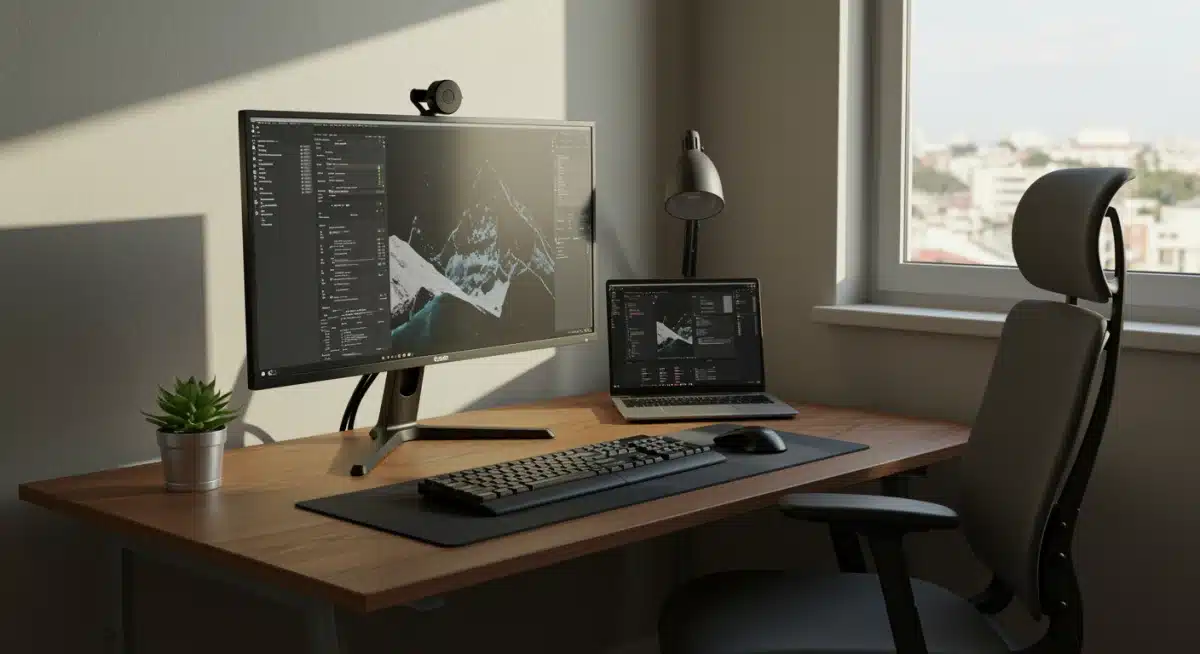
Incorporating these wellness practices into your remote work setup is not about reducing your work hours, but about optimizing the quality of your work within those hours. By prioritizing your physical and mental health, you create a sustainable model for remote productivity that prevents burnout and promotes sustained high performance. This holistic approach ensures that your remote work setup supports not just your tasks, but your entire well-being in 2026 and beyond.
The Future of Your Remote Work Setup: Beyond 2026
As we’ve explored, optimizing your remote work setup is a continuous process, not a one-time fix. The five tweaks discussed – ergonomic excellence, decluttering, connectivity, soundscape mastery, and wellness integration – form a robust framework for building a highly productive and healthy home office. But what does the future hold for the remote work setup beyond 2026?
Expect to see even greater advancements in personalized technology. AI-powered tools will likely play a larger role in optimizing individual workflows, suggesting ideal break times, adjusting lighting, and even monitoring posture in real-time. Haptic feedback devices could provide more immersive virtual meeting experiences, and augmented reality (AR) might seamlessly blend digital information with your physical workspace, reducing the need for multiple physical monitors.
Furthermore, the focus on sustainability will intensify. Remote work setups will increasingly incorporate eco-friendly materials, energy-efficient devices, and smart systems designed to reduce carbon footprint. Companies might offer more comprehensive stipends for employees to invest in sustainable home office solutions.
The concept of “third spaces” – hybrid work models that combine home offices with co-working spaces or satellite offices – will also continue to evolve. This means your home remote work setup will need to be flexible and easily adaptable, allowing for seamless transitions between different work environments.
Ultimately, the goal remains the same: to create a remote work setup that empowers you to do your best work, supports your well-being, and adapts to the ever-changing demands of the professional world. By proactively implementing the strategies outlined in this guide, you are not just optimizing your current setup; you are future-proofing your career and investing in a more productive, healthier, and fulfilling remote work journey for years to come.
Conclusion: Elevate Your Remote Work Setup for Peak Performance
The journey to an optimized remote work setup is a continuous one, but the rewards – enhanced productivity, reduced stress, and improved well-being – are immeasurable. By focusing on ergonomic excellence, embracing digital and physical minimalism, ensuring robust connectivity, mastering your soundscape, and integrating wellness into your routine, you are setting yourself up for unparalleled success in the remote work landscape of 2026 and beyond.
Remember, your remote work setup is more than just a collection of tools; it’s your personal command center, a space designed to foster creativity, concentration, and sustained output. Don’t settle for a mediocre environment when the power to create an exceptional one is within your grasp. Take these five tweaks, apply them thoughtfully, and watch as your productivity soars and your remote work experience transforms into one of efficiency, comfort, and profound satisfaction. The future of work is here, and with an optimized remote work setup, you’re ready to lead the way.